FPS vs Frame Pacing: Benchmarking the Hidden Stutter in Modern Up-scaling Tech
In 2026, the entire PC gaming industry is running on an illusion. If you buy a modern graphics card—whether it’s an NVIDIA RTX 50-series powered by Blackwell or an AMD Radeon RX 9000-series powered by RDNA 4—the marketing materials all promise the same thing: effortless, uncompromised 4K gaming at 120+ frames per second.
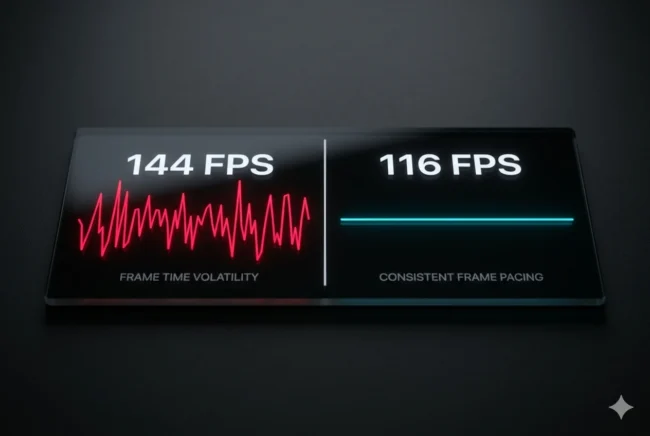
And if you boot up a demanding title like Cyberpunk 2077 or Crimson Desert and glance at the MSI Afterburner overlay in the top corner of your screen, the software will validate that marketing. The FPS counter will proudly display 144 FPS. But your hands and your eyes will tell you a completely different story. The camera pans will feel jerky, mouse inputs will feel disconnected, and sudden micro-stutters will ruin the immersion.
Welcome to the era of AI upscaling and Multi-Frame Generation, where raw FPS numbers have become entirely divorced from actual gameplay smoothness. The battleground for PC performance is no longer about how many frames your GPU can render; it is entirely about how evenly those frames are delivered to your monitor. Here is the highly technical breakdown of the difference between FPS and frame pacing, why DLSS 4 and FSR 4 are actively hiding massive stutters, and how to mathematically fix your gaming experience.
The Math of the Illusion: Averages vs. Intervals
To understand why a game running at a reported 120 FPS can feel like a jagged, unplayable mess, we must first understand the fundamental flaw of the “Frames Per Second” metric itself. FPS is an average, and averages easily hide extreme volatility.
The Frame Time Reality
The 8.33ms Target: If a game is running at a perfectly smooth 120 FPS, the GPU is delivering a new frame to the monitor exactly once every 8.33 milliseconds. If every single frame takes exactly 8.33ms to render and display, your brain perceives flawless, fluid motion.
The Stutter Sequence: Now, imagine a scenario where the GPU renders 119 frames in 1 millisecond each, but the engine stalls on a heavy physics calculation and takes 881 milliseconds to render the 120th frame. Mathematically, the GPU still rendered 120 frames within one second. The FPS counter will happily display “120 FPS.” But to the player, the game effectively froze for nearly a full second.
This variance between frame deliveries is known as frame pacing. A game locked at a perfectly paced 60 FPS (with a flat, consistent 16.6ms frame time) will always feel vastly superior and smoother to play than a wildly fluctuating 120 FPS that rapidly bounces between 5ms and 30ms frame times.
The Frame Generation Problem: DLSS 4 and FSR 4
The frame pacing crisis has been massively accelerated by the widespread adoption of AI frame interpolation. NVIDIA’s DLSS 4 and AMD’s machine-learning-powered FSR 4 no longer just upscale the resolution; they literally invent new frames out of thin air to artificially boost the FPS counter.
Multi-Frame Generation Desync
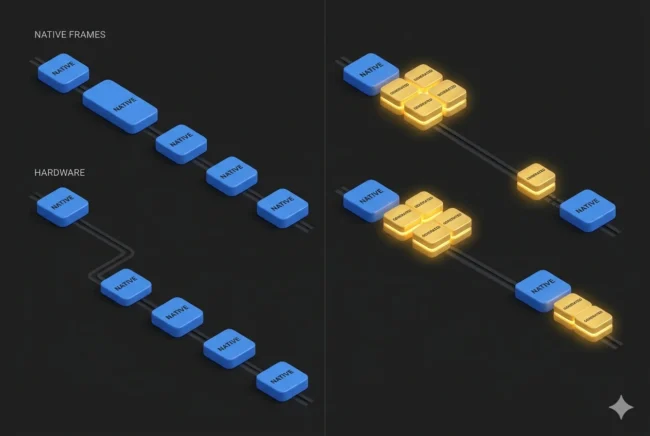
The DLSS 4 Engine: DLSS 4 introduces “Multi-Frame Generation” (MFG). Utilizing the 5th generation Tensor cores on RTX 50-series cards, the AI can now generate up to three interpolated frames between every natively rendered frame. Your GPU renders Frame 1 and Frame 5, and the AI guesses and inserts Frames 2, 3, and 4.
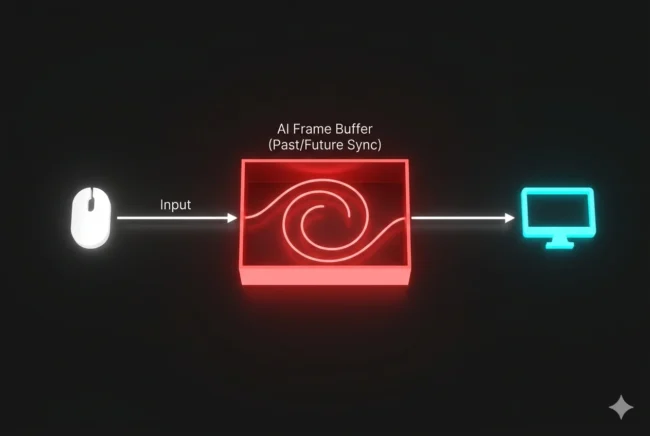
The Dispatch Delay: The underlying problem is that generating a frame takes a different amount of processing time than natively rendering one. Furthermore, the AI must briefly hold the native frames in a buffer to analyze the motion vectors before it can inject the generated frames.
The Pacing Wreck: This often results in a scenario where the native frames and generated frames are dispatched to the monitor at highly uneven intervals. You might get three generated frames delivered 3ms apart, followed by a 15ms gap while the GPU finishes the next native frame. The FPS counter reads an incredible 180 FPS, but the erratic spacing creates a rhythmic, pulsating micro-stutter that makes panning the camera feel physically nauseating.
The Engine-Level Stutter Amplifier
When a game engine stutters naturally—for example, when a CPU pauses to compile a shader on the fly—the rendering pipeline halts.
Frame generation algorithms require accurate motion vector data from past and future frames to work. When a shader compilation stutter occurs, the motion vectors become corrupted. The AI panics, resulting in either a massive visual artifact (ghosting/smearing) or an amplification of the stutter, as the frame generator shuts down momentarily and the frame rate violently crashes from 120 back down to the native 40.
The Input Latency Tax
The second hidden cost of modern upscaling tech is input latency. Frame generation decouples what you see on the screen from what your mouse and keyboard are actively doing.
The Disconnect: Because the AI must hold a natively rendered frame in a buffer to calculate the fake intermediate frames, you are inherently looking at the past. When you click your mouse to fire a weapon, the game logic registers it, but you will not see the muzzle flash on screen until the upscaler finishes its buffering sequence.
The 20ms Threshold: Competitive gamers can actively feel any input lag exceeding 20 milliseconds. While NVIDIA Reflex 2.0 does a phenomenal job of mitigating this on DLSS 4 (keeping added latency around 8-12ms), independent testing on AMD’s FSR 4 shows it can add anywhere from 15ms to 25ms of latency depending on the base frame rate.
The Base Frame Rate Rule: This is why both NVIDIA and AMD quietly recommend that you should only enable Frame Generation if your PC can already render the game natively at 60 FPS. Trying to use DLSS 4 or FSR 4 to “save” an old CPU that is only pushing 30 FPS will result in unplayable, sluggish input lag that makes aiming in a first-person shooter practically impossible.
Fixing the Pacing: The V-Sync Paradox
So, how do we fix this? If the upscaling algorithms are inherently prone to bad frame pacing, how are hardcore PC builders achieving the smooth gameplay promised by the marketing? In 2026, the community has discovered a highly specific, counter-intuitive fix: you must forcibly regulate the algorithm.
The VRR and Cap Solution
If you are experiencing heavy micro-stutter while using DLSS 4 or FSR 4 on a Variable Refresh Rate (VRR) monitor, the solution is to remove the algorithm’s freedom to run as fast as it wants.
Enable V-Sync in the Control Panel: Force V-Sync to “On” at the driver level (NVIDIA Control Panel or AMD Adrenalin). Do not use the in-game V-Sync option, as engine-level V-Sync is notoriously buggy with frame generation.
Cap the Frame Rate: Use a tool like RivaTuner Statistics Server (RTSS) or the driver-level frame limiter to cap your maximum frame rate to 3 to 4 frames below your monitor’s maximum refresh rate (e.g., cap it at 116 FPS on a 120Hz display).
Why This Works: By capping the frame rate below the maximum refresh window, you ensure that VRR (G-Sync or FreeSync) remains continuously active. More importantly, by forcing V-Sync, you dictate a strict, mathematical interval for the frame generation algorithm. The AI is no longer allowed to spit out frames sporadically; it is forced to align its generated frames with the strict 8.33ms (for 120Hz) pacing dictated by the driver. This almost entirely eradicates upscaling micro-stutter.
The Verdict: Stop Looking at the Number
We have been conditioned by decades of benchmark reviews to view higher FPS as the ultimate goal of PC building. But as neural rendering, DLSS 4, and FSR 4 completely take over the graphics pipeline, that number has become a deceptive vanity metric.
If you want to truly evaluate the performance of your hardware, you must turn off the simple FPS counter. Download CapFrameX or enable the frametime graph in RivaTuner. Look at the line. If it is a flat, consistent, boring horizontal line, you have achieved perfect performance. If it looks like an erratic electrocardiogram, your 144 FPS is a lie, and it is time to start capping your frames. In the modern era of PC gaming, pacing is king, and raw speed means absolutely nothing if you can’t control it.
Tech ReviewerFounder & Publisher: Sole operator and lead technical architect of MultiCore Performance
Areas of Expertise:
Silicon & Hardware Benchmarking: Firsthand performance testing and analysis of flagship processors specifically evaluating thermal and rendering capabilities in gaming and video editing workloads.,